How to Set Up Digital Key
How to Set Up and Use Hyundai Digital Key
Enter The Age Of Digital Keyless Entry
Technology has revolutionized the way we interact with our vehicles, and Hyundai is at the forefront of innovation with its Digital Key feature. The Hyundai Digital Key allows you to unlock, start, and drive your car with just your smartphone. No more fumbling for a key or worrying about losing it. For customers of Kelly Hyundai of Stroudsburg, this feature brings both convenience and peace of mind. Whether you just purchased a Hyundai with this feature or are considering adding it to your vehicle, this guide will walk you through everything you need to know about setting it up, using it, and what to do if you need help.
Let's explore the world of the Hyundai Digital Key and how it can enhance your driving experience.
What is Hyundai Digital Key?
Hyundai Digital Key is a smartphone-based system designed to replace your traditional key fob. It uses Near Field Communication (NFC) and Bluetooth, enabling you to lock, unlock, and start your Hyundai vehicle. Beyond the basics, it also allows you to share access with friends and family by creating temporary or permanent digital key profiles.
If you're a customer at Kelly Hyundai of Stroudsburg, you’ve likely already heard about this feature if you were browsing the latest Hyundai models like the Hyundai Sonata, Elantra, or Palisade. These models come equipped with advanced technology to ensure seamless compatibility with the Hyundai Digital Key.
Benefits of Hyundai Digital Key
Before we get into the setup process, let's take a closer look at the benefits of the Hyundai Digital Key:
- Convenience: With the Hyundai Digital Key, your smartphone becomes your key. There's no need to carry a separate key or worry about misplacing it. Everything you need is on your phone.
- Customizable Access: You can share your Hyundai with other drivers through the app. Whether it's a family member borrowing your car or a friend in need, you can grant them temporary or permanent access.
- Enhanced Security: Your phone is inherently more secure than a traditional key. Additionally, Digital Key's NFC technology ensures that your car responds only when your phone is very close to the door handle, preventing unauthorized access.
- Backup Options: While the Digital Key primarily uses your smartphone, you also get an NFC key card as a backup. This slim card provides peace of mind if your phone isn’t handy.
- Added Features via the App: The Hyundai Digital Key integrates with the MyHyundai app, giving you remote access to crucial information and features like car location, climate control, and more.
Now that you understand the “why,” let's move on to the “how.”
Step-by-Step Guide to Setting Up the Hyundai Digital Key
The setup can seem intimidating if you’re new to the Hyundai Digital Key. But don’t worry—we’ve broken it down into a clear and simple process.
Step 1: Check Compatibility
Before you start, ensure your Hyundai vehicle and smartphone are compatible with the Hyundai Digital Key. Currently, the Digital Key is available for newer Hyundai models and requires an Android smartphone with NFC capabilities. Apple iPhones do not support Hyundai Digital Key natively, though this could change.
To confirm compatibility, check your vehicle’s owner manual or visit Kelly Hyundai of Stroudsburg, where their expert team can walk you through the requirements.
Step 2: Download the Digital Key App
Visit the Google Play Store on your smartphone and download the Hyundai Digital Key app. This app is separate from the MyHyundai app but fully integrates with it.
Step 3: Register Your Vehicle
Once the app is installed, follow these steps:
- Open the app and log in using your MyHyundai account credentials. If you don’t have an account, you can create one directly from the app.
- Follow the on-screen prompts to register your vehicle. You'll need your car’s Vehicle Identification Number (VIN), which can be found on your registration card or displayed on the driver’s side dashboard.
Step 4: Pair the App with Your Hyundai
This step requires you to be inside your car. Here’s what to do:
- Place the physical key fob on the wireless charging pad inside your car.
- Turn the car on and put it in Park.
- Use the Hyundai Digital Key app to scan for your vehicle. The app will guide you through pairing via Bluetooth.
- Once paired, hold your smartphone close to the car's NFC reader, typically located on the driver-side door handle.
Step 5: Set Up NFC Key Card (Optional)
Your Hyundai comes with an NFC key card that serves as a backup to your phone. To set it up:
- Place the card on the wireless charging pad in the vehicle.
- Use the app to register the card to your profile.
Step 6: Customize Digital Key Settings
Within the app, you can now customize settings for your Digital Key. For example, you can:
- Create access profiles for other drivers.
- Adjust preferences for locking, unlocking, and engine start.
And just like that, you’re ready to use your Hyundai Digital Key!
How to Use Hyundai Digital Key
Using your Hyundai Digital Key is straightforward once set up. Here are the core functions:
1. Unlocking Your Vehicle
With your smartphone in hand, walk up to your car. Hold your phone near the driver-side door handle’s NFC sensor until the doors unlock.
2. Starting the Engine
Place your smartphone on the wireless charging pad or the NFC reader inside the vehicle. Hold the brake pedal and press the Start/Stop button to start the engine.
3. Locking Your Vehicle
When you leave the vehicle, hold your phone near the same NFC reader on the door handle to lock the car. You can also lock and unlock remotely using the app.
4. Sharing Access
To share access, open the Hyundai Digital Key app and select the Share feature. Add the recipient by entering their email address. They’ll receive instructions to download the app and activate their key.
Common Troubleshooting Tips
Even the most innovative technology occasionally faces hiccups. Here are a few quick fixes if you run into issues:
1. Unable to Pair Phone with Car
Ensure NFC and Bluetooth are enabled on your phone. If the problem persists, restart both your phone and your car, then attempt pairing again.
2. Smartphone Doesn’t Unlock the Car
Check that your phone is close enough to the NFC reader on the door handle. If you are still facing issues, ensure your Digital Key profile is active within the app.
3. NFC Key Card Not Working
Double-check that the card is registered correctly in the app. If problems persist, your NFC reader or card may need maintenance.
4. Digital Key Deleted Accidentally
If you delete your Digital Key profile, you’ll need to re-register through the Hyundai Digital Key app before regaining access.
For more complex technical issues, don’t hesitate to get in touch with the professionals at Kelly Hyundai of Stroudsburg.
When to Consult with a Professional
While the setup process is designed to be user-friendly, there may be times when professional assistance is necessary. If you encounter unresolved technical issues or prefer a hands-on demonstration, the Service Department at Kelly Hyundai of Stroudsburg is here to help.
Our experienced technicians are well-versed in Hyundai’s latest technology, including the Digital Key and Hyundai Bluelink. Whether you need help with setup, troubleshooting, or replacing an NFC key card, you can count on their expertise. They’re also available to assist with software updates and ensure your vehicle's technology is running at its best.
To schedule an appointment, give the service department a call or visit the dealership in Stroudsburg. They take pride in exceptional customer service, making sure your Hyundai experience is stress-free and enjoyable.
Final Thoughts
The Hyundai Digital Key is a game-changer, simplifying the way you interact with your vehicle. Whether it's the convenience of using your smartphone as a key, the security features, or the ability to quickly share access with loved ones, this innovative technology adds value to your driving experience.
With this guide, you’re equipped to set up and use the Digital Key with confidence. If you have any questions or need extra support, the knowledgeable team at Kelly Hyundai of Stroudsburg is just a call away. Whether it’s a simple question or a more complex request, their service department is ready to help you get the most out of your Hyundai.
Enjoy the freedom and functionality your Digital Key provides—because driving a Hyundai is about both performance and smart technology. Happy driving!
Kelly Hyundai of Stroudsburg
Address
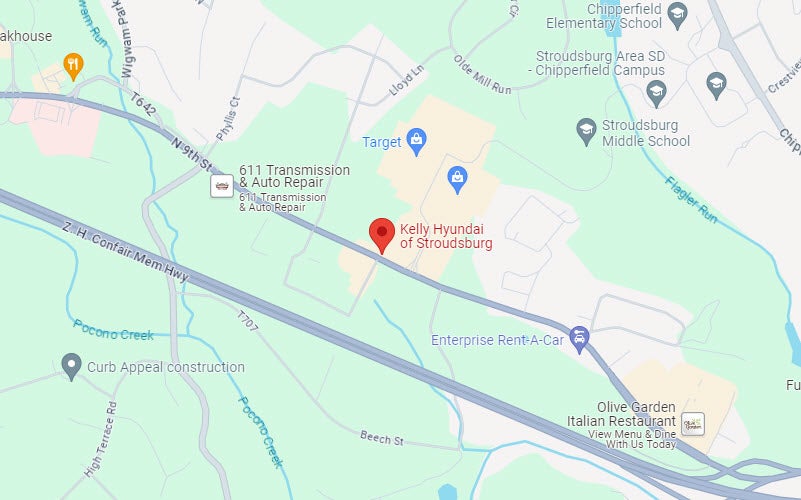
1534 North 9th Street
Stroudsburg, PA 18360
Phone
- Sales 570-776-9161
- Parts 570-776-9146
- Service 570-776-9311
| Monday | 9:00AM - 8:00PM |
| Tuesday | 9:00AM - 8:00PM |
| Wednesday | 9:00AM - 8:00PM |
| Thursday | 9:00AM - 8:00PM |
| Friday | 8:00AM - 7:00PM |
| Saturday | 9:00AM - 6:00PM |
| Sunday | Closed |
| Monday | 7:00AM - 6:00PM |
| Tuesday | 7:00AM - 6:00PM |
| Wednesday | 7:00AM - 6:00PM |
| Thursday | 7:00AM - 6:00PM |
| Friday | 7:00AM - 6:00PM |
| Saturday | 7:00AM - 5:00PM |
| Sunday | Closed |
| Monday | 7:00AM - 6:00PM |
| Tuesday | 7:00AM - 6:00PM |
| Wednesday | 7:00AM - 6:00PM |
| Thursday | 7:00AM - 6:00PM |
| Friday | 7:00AM - 6:00PM |
| Saturday | 7:00AM - 5:00PM |
| Sunday | Closed |